The track is fully booked. Until someone cancels.
Cancellations happen on the Great Walks every day. We watch the DOC booking system around the clock and tell you the moment a spot matching your dates opens up.
Three steps between you and a fully booked hut
Tell us your dates
Pick a track, a date range and your group size. One alert can cover huts, campsites, or both.
We watch the DOC system
Our monitor checks availability every minute, day and night, for as long as your alert runs.
You book it first
A match sends you an email, a Telegram message or a browser notification, with the huts, dates and a booking link.
An alert you can act on in seconds
Every notification names the track, the exact huts and nights, and links straight to the DOC booking page. Nothing to look up.
Glade Wharf → Clinton Hut
Clinton Hut → Mintaro Hut
greatwalks.online/book
Cancellations we caught in the last 72 hours
Every card is a real night where DOC's booking system suddenly showed more free spots than before, because someone cancelled. This is what an alert would have told you.
See what's free before you set an alert
Live, night-by-night availability for every place we watch, ranked by how hard it is to book.
Cancellation and booking guides
How DOC bookings work, when sold-out tracks free up through cancellations, and how to act on an alert.
Start free. Upgrade when a trip is on the line.
Every plan watches Great Walks and backcountry huts. Paid plans alert you instantly.
- ✓ Watch up to 3 days
- ✓ Email alerts, sent 4 hours after a match
- ✓ 1 active alert
- ✓ Watch up to 120 days
- ✓ Instant alerts
- ✓ Email, Telegram and browser
- ✓ Unlimited active alerts
Frequently asked questions
The Department of Conservation (DOC) manages the Great Walks booking system:
- Booking Season: Opens in May/June for the upcoming season (October to April)
- Peak Times: December to March are the most popular months
- Booking Process: All bookings must be made through the DOC website
- Preparation: Create your DOC account before booking day
Success rates depend on several factors:
- Milford Track: Most competitive - books out within hours
- Group Size: Better chances for 1-2 people vs larger groups
- Timing: Peak season (Dec-Feb) is hardest to secure
- Flexibility: Having multiple date options increases chances
- Cancellations: Regular spots become available through cancellations
Our alert system helps you secure cancelled spots:
- 24/7 monitoring of the DOC booking system
- Instant email notifications when spots match your criteria
- Track multiple huts and dates simultaneously
- Customizable group size requirements
- Real-time availability updates
Yes. Alongside the 10 Great Walks we watch 24 popular DOC huts and campsites, including Mueller Hut, Angelus Hut, Welcome Flat Hut and the Mt Holdsworth-Jumbo Circuit.
Every plan can watch them. Browse them all on the hut explorer, or pick one in the alert form at the top of this page.
We offer three plans to suit different needs:
- Free Plan ($0):
- 1 alert at a time, 3-day monitoring window
- Email notifications only
- 4-hour notification delay
- Advanced Plan ($8.99):
- 1 alert at a time, 14-day monitoring window
- Instant email notifications
- Perfect for single trek planning
- Premium Plan ($9.99) — Most Recommended:
- Unlimited alerts, 120-day monitoring window
- Instant notifications via Email, Telegram & browser
- Best option for serious Great Walk planners
Why Premium is Most Effective: Instant multi-channel alerts (Email + Telegram + browser) mean you're notified within minutes of a cancellation — before free-plan users even see it.
You can easily manage your alerts in a few simple steps:
- Log in to your account
- Navigate to the "My Treks" page
- Find the alert you want to stop
- Click the "Delete Alert" button next to it
Additional tips:
- Alerts will automatically expire after their duration period (3, 14, or 120 days depending on your plan)
- If you've successfully booked your trek, please remember to cancel the corresponding alert
- You can always set up new alerts if your plans change
Explore detailed information about each Great Walk and set up availability notifications:
- Milford Track: Fiordland's finest - waterfalls and fjords
- Routeburn Track: Alpine scenery and lake views
- Kepler Track: Mountain vistas and native forests
- Tongariro Northern Circuit: Volcanic landscapes and emerald lakes
- Abel Tasman Coast Track: Coastal paradise with golden beaches
- Heaphy Track: Diverse landscapes from forest to coast
- Lake Waikaremoana: North Island's premier forest and lake experience
- Paparoa Track: New Zealand's newest Great Walk with coastal cliffs
- Rakiura Track: Stewart Island's remote wilderness experience
- Whanganui Journey: Unique river journey through cultural heritage
Tip: Each track page includes detailed availability monitoring information and direct access to set up notifications for that specific Great Walk.
Consider these seasonal factors:
- Summer (Dec-Feb): Best weather but hardest to book
- Autumn (Mar-Apr): Quieter trails, stable weather
- Spring (Oct-Nov): Fewer crowds, variable conditions
- Winter: Some tracks closed or require alpine skills
Follow these tips for best results:
- Set up alerts early - ideally months before your planned dates
- Include multiple consecutive dates in your alert
- Consider both huts and campsites if available
- Check your email promptly when notifications arrive
- Have your DOC account ready for quick booking
Act quickly with these steps:
- Check your email immediately - spots can go quickly
- Click through to DOC's booking system
- Log in to your DOC account
- Complete the booking process
- Deactivate or update your alert if successful
We're here to help with any questions or support needs:
- Email: contact@greatwalks.online
- We aim to respond to all inquiries within 24 hours
- For urgent booking issues, please include your alert ID in the subject line
- We can help with:
- Technical support with alerts
- Booking strategy advice
- Account issues
- General questions about Great Walks
Contact us if you:
- Are not receiving expected alerts
- Need help setting up alerts
- Have questions about track availability
- Experience technical issues with the website
- Need to report a bug or suggest an improvement
If our notification emails are appearing in your Gmail Promotions tab instead of Primary, here's how to fix it:
- Open the email in Promotions tab: Go to your Gmail Promotions tab and find an email from "Great Walk Tracker" or "admin@greatwalks.online"
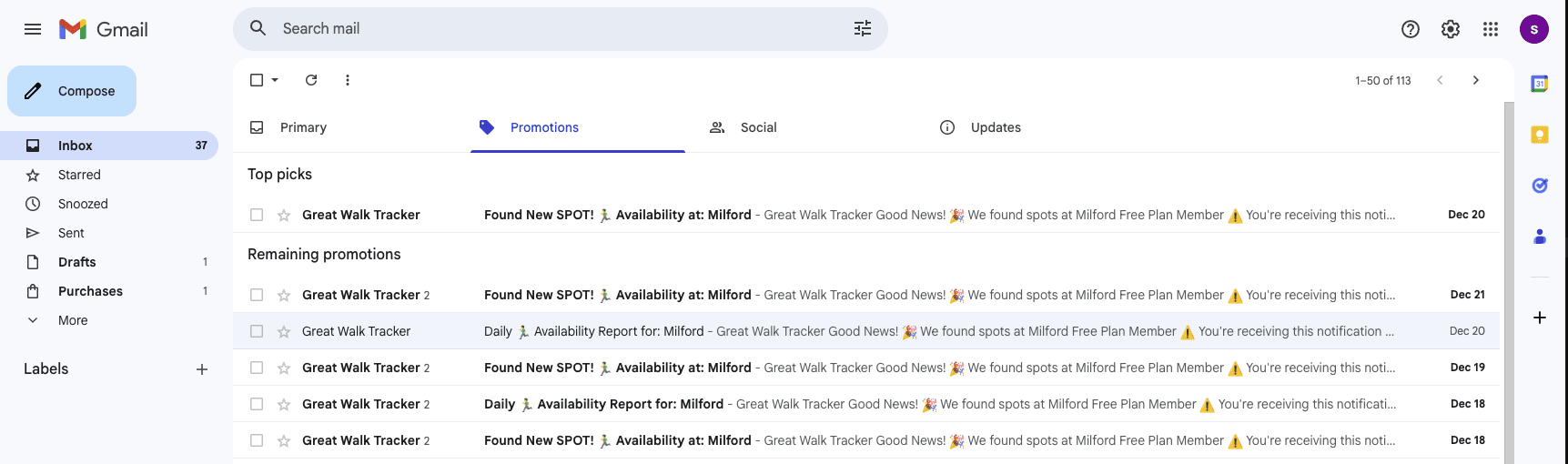
- Drag the email to Primary: Simply drag the email from the Promotions tab to the Primary tab, OR
- Use the Move option:
- Open the email
- Click the folder icon (or "Move to" option) at the top
- Select "Primary"
- Set for future emails: When you move the email, Gmail will show a notification asking "Do this for future messages from admin@greatwalks.online?" - Click "Yes" to ensure all future notifications go directly to your Primary inbox

Alternative method using Filters:
- Click the gear icon (⚙️) in Gmail and select "See all settings"
- Go to the "Filters and Blocked Addresses" tab
- Click "Create a new filter"
- In the "From" field, enter:
admin@greatwalks.online - Click "Create filter"
- Check "Never send it to Spam" and "Always mark it as important"
- Select "Categorize as: Primary"
- Click "Create filter"
Why this matters: Moving our emails to Primary ensures you see important availability alerts immediately, rather than missing them in the Promotions tab. This is especially critical for time-sensitive cancellation notifications!
Someone will cancel. Be the one who's watching.
Set up your first alert in under a minute. The free plan needs no card.
Set up an alert